
Several counters, one database
Counter computers connect to the main computer over the shop network. Each counter has its own printer and cash drawer, and every sale lands in the same stock.
A grocery store or supermarket runs on speed at the tills and control behind them. Pakrox Universal ERP gives each counter a fast barcode screen while the owner keeps one set of stock, accounts and reports.
Made for
In short
Supermarket POS software is a program that handles billing, stock, customer accounts and reports for supermarkets, grocery stores, cash and carry. Pakrox Universal ERP is supermarket POS software for Windows that works without internet and keeps its data on your own computer. After a free 7-day trial it costs Rs 2,500 a month, or Rs 50,000 once for a lifetime licence with every feature.
The problem
These are the things owners tell us about before they change their software. If two of them sound familiar, the rest of this page is for you.
One slow counter in the evening rush costs sales, and a frozen screen costs more.
Without a counted opening and closing, a short till cannot be traced to a person.
Food and cosmetics pass their date unnoticed and are found by a customer, not by staff.
Cashiers change rates or give discounts and the owner finds out weeks later, if at all.
Supermarket POS software features
Every feature below is in Pakrox Universal ERP today. Some are switched on in settings, and a few are add-ons on the monthly plan (all of them are included in the lifetime licence).
Counter computers connect to the main computer over the shop network. Each counter has its own printer and cash drawer, and every sale lands in the same stock.
A cashier opens a shift with counted cash and closes it by counting again. Blind closing hides the expected amount, and the difference is recorded.
Each batch carries its expiry date. The earliest-expiring batch is sold first, expired stock cannot be billed, and a report lists what expires soon.
Set the highest discount each role may give. Anything beyond it needs a manager's PIN, and the approval is written to the audit log.
Put a screen near the aisle: customers scan an item and see its price, pack price, MRP saving and any offer.
Group sales, purchases or stock by company, category, month or customer and save the report for the dashboard.
See it
This is the real Pakrox Universal ERP sale screen with sample data: customer, items with batch and expiry, discount, payment and the bill total, all without leaving the keyboard.
More about Pakrox Universal ERP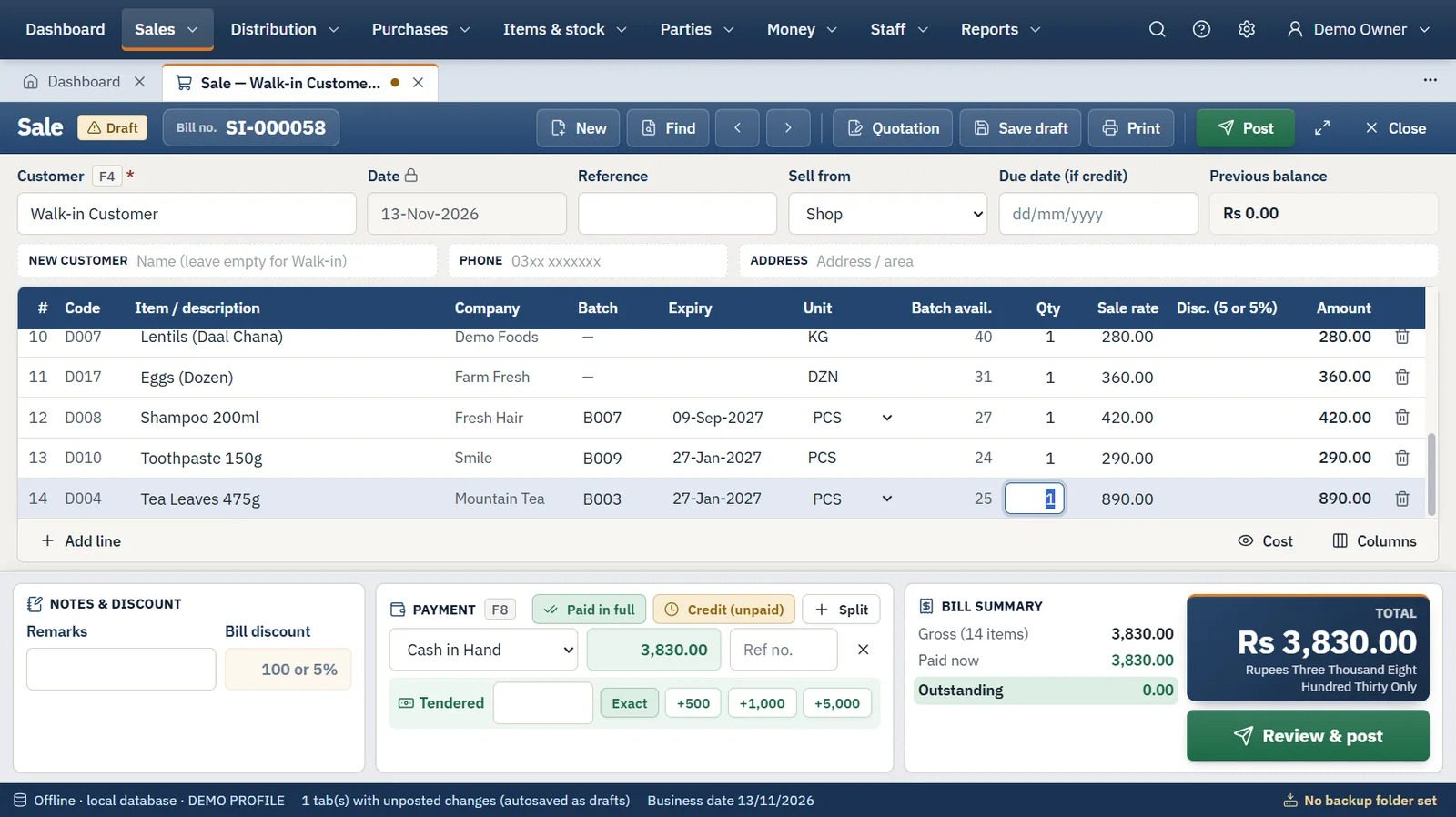
How it works
The same four steps run every day, whatever you sell.
Step 1
We install the program and import your items, customers, suppliers and opening balances from Excel or your old software.
Step 2
Enter the supplier's invoice with batches, packs and carriage. Stock, cost and the supplier's balance update together.
Step 3
Scan or type, take cash, bank or credit, and print. Several bills can stay open in tabs at once.
Step 4
Count the cash, back up to a USB drive, and read sales, profit, stock and receivables in the reports.
Also included
Hardware
FAQ
What supermarket owners ask us before they start. Anything else? Ask us directly.
Several. One computer holds the data and the others connect to it over your shop Wi-Fi or cable network using a pairing key. The main computer has to stay on while the counters work.
Nothing changes. Pakrox Universal ERP is an offline program with its database on your own computer, so billing does not depend on the internet.
Yes. Barcode labels can be printed from the product list for items you pack or weigh yourself.
Yes. Tax can be charged on each item or on the whole bill, and each bill keeps the percentages and amounts it was posted with.
No. It is an offline Windows program with its database on your own computer. The internet is used only for licence checks and updates: a lifetime licence keeps working for 30 days without it, a monthly licence for 3 days.
After a free 7-day trial there are two ways to pay. Monthly is Rs 2,500 for the shop software with accounting on one computer, with extra features as add-ons at Rs 1,000 a month each. Lifetime is Rs 50,000 once with every feature included, and updates and support are free for the first year, then Rs 8,000 a year.
Backups run on a schedule to a USB drive or second disk and can be locked with a password. Every backup is checked before it is kept, and restoring is validated before anything changes.
Start a project
Tell us what you need — your message comes straight to our team and we'll get back to you soon.