
Sell loose goods by weight or by rupees
Tick an item as sold loose and the bill asks for kilos or rupees. Type 230 and it puts 1.438 kg at Rs 160 on the bill, to the exact rupee.
A general store sells packed goods by barcode and loose goods by weight, mostly to regular customers who pay later. Pakrox Universal ERP handles all three at the same counter, and it keeps working when the internet does not.
Made for
In short
Kiryana store POS software is a program that handles billing, stock, customer accounts and reports for kiryana stores, general stores, mini marts. Pakrox Universal ERP is kiryana store POS software for Windows that works without internet and keeps its data on your own computer. After a free 7-day trial it costs Rs 2,500 a month, or Rs 50,000 once for a lifetime licence with every feature.
The problem
These are the things owners tell us about before they change their software. If two of them sound familiar, the rest of this page is for you.
A customer asks for "Rs 230 of sugar" and the cashier has to work out the weight by hand while the queue grows.
Credit is written in a notebook, so nobody knows the real balance until the customer argues about it.
Company price lists move often, and updating hundreds of items one by one never gets finished.
Sales are counted at night, but cost, expenses and stock losses are guessed.
Kiryana store POS software features
Every feature below is in Pakrox Universal ERP today. Some are switched on in settings, and a few are add-ons on the monthly plan (all of them are included in the lifetime licence).
Tick an item as sold loose and the bill asks for kilos or rupees. Type 230 and it puts 1.438 kg at Rs 160 on the bill, to the exact rupee.
Scan the pack or type part of the name and press Enter. A whole bill can be made without touching the mouse.
Each customer has a ledger and a credit limit. Press F9 on the bill to see the balance, and print the previous balance on the receipt.
Raise every item of one company by a percentage or a fixed amount in one step, with a preview first and a price history kept for every item.
Buy by the carton and sell by the piece. Stock, cost and profit stay correct in both units.
Count the till, see any short or excess, and read the day's sales, credit given and profit before you lock the shop.
See it
This is the real Pakrox Universal ERP sale screen with sample data: customer, items with batch and expiry, discount, payment and the bill total, all without leaving the keyboard.
More about Pakrox Universal ERP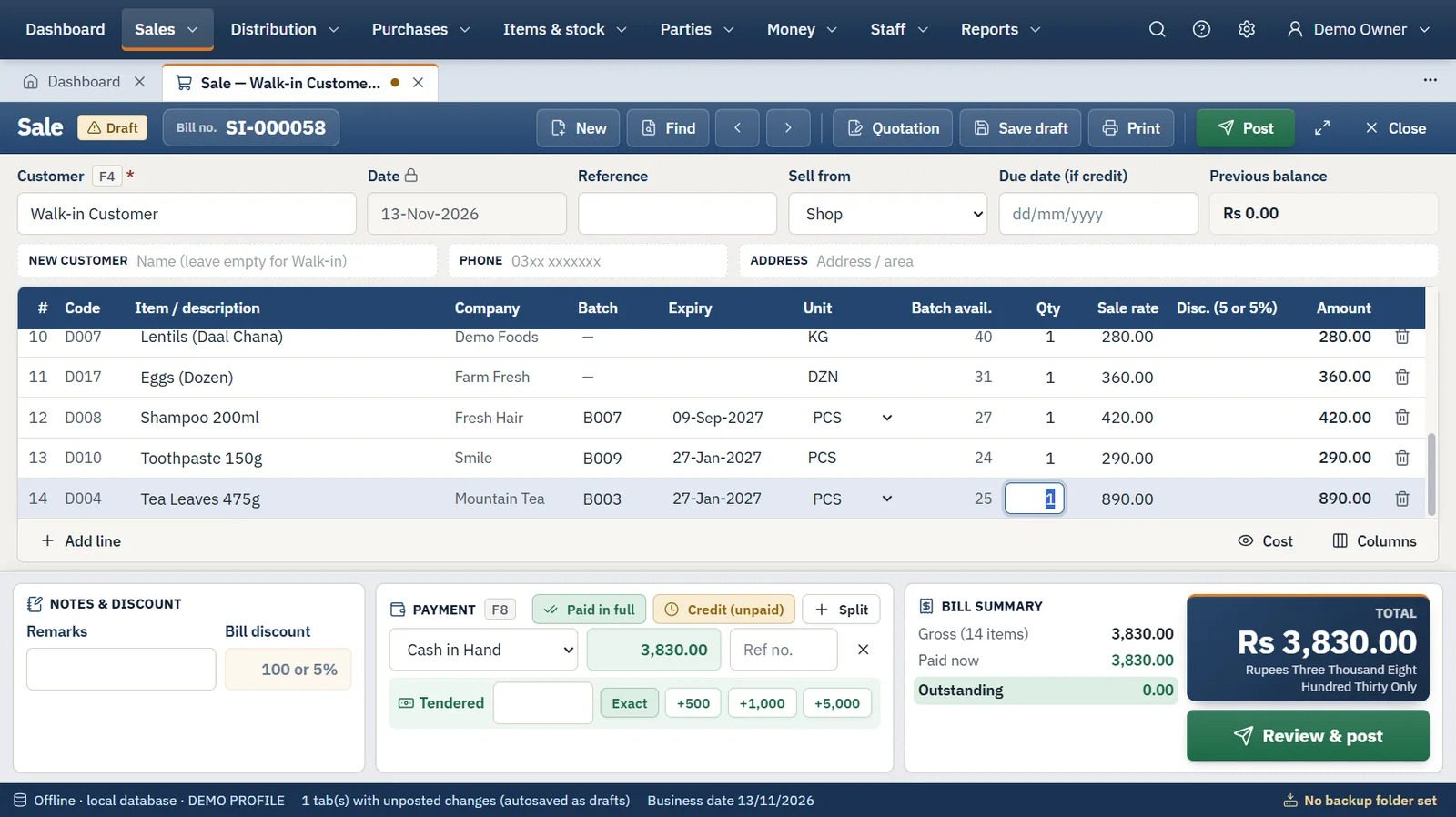
How it works
The same four steps run every day, whatever you sell.
Step 1
We install the program and import your items, customers, suppliers and opening balances from Excel or your old software.
Step 2
Enter the supplier's invoice with batches, packs and carriage. Stock, cost and the supplier's balance update together.
Step 3
Scan or type, take cash, bank or credit, and print. Several bills can stay open in tabs at once.
Step 4
Count the cash, back up to a USB drive, and read sales, profit, stock and receivables in the reports.
Also included
Hardware
FAQ
What kiryana store owners ask us before they start. Anything else? Ask us directly.
Yes. Mark the item as sold loose and the sale screen opens a small box for kilos or rupees, with quick buttons for a quarter, half, one, two and five kilos.
Pakrox Universal ERP reads the barcode labels that label-printing scales produce: scan the label and the item comes onto the bill with its weight. You set the label format of your scale once in settings.
Every named customer has a ledger with bills, payments and one running balance. You can set a credit limit, print statements and see who is overdue.
Items can be imported from an Excel or CSV file exported from your old software, so most shops start billing within a day or two.
No. It is an offline Windows program with its database on your own computer. The internet is used only for licence checks and updates: a lifetime licence keeps working for 30 days without it, a monthly licence for 3 days.
After a free 7-day trial there are two ways to pay. Monthly is Rs 2,500 for the shop software with accounting on one computer, with extra features as add-ons at Rs 1,000 a month each. Lifetime is Rs 50,000 once with every feature included, and updates and support are free for the first year, then Rs 8,000 a year.
Backups run on a schedule to a USB drive or second disk and can be locked with a password. Every backup is checked before it is kept, and restoring is validated before anything changes.
Start a project
Tell us what you need — your message comes straight to our team and we'll get back to you soon.