
Batch and expiry on each line
Bills made from orders take the batch that expires first, and you can change the batch on the line. Expired stock cannot be billed.
Medicine distribution combines the route work of any distributor with the batch and expiry discipline of a pharmacy. Pakrox Universal ERP bills every line from a specific batch and keeps bonus, discount and claim records company by company.
Made for
In short
Medicine distribution software is a program that handles billing, stock, customer accounts and reports for medicine distributors, pharma wholesalers, surgical and disposable suppliers. Pakrox Universal ERP is medicine distribution software for Windows that works without internet and keeps its data on your own computer. After a free 7-day trial it costs Rs 2,500 a month, or Rs 50,000 once for a lifetime licence with every feature.
The problem
These are the things owners tell us about before they change their software. If two of them sound familiar, the rest of this page is for you.
A bill that does not match the batch delivered is a compliance problem, not just a stock one.
Medical stores return short-dated stock, and it has to go back to the company as a claim.
Each company and each product has its own bonus and trade discount structure.
Sales tax, advance tax and withholding appear on company invoices and must be entered as billed.
Medicine distribution software features
Every feature below is in Pakrox Universal ERP today. Some are switched on in settings, and a few are add-ons on the monthly plan (all of them are included in the lifetime licence).
Bills made from orders take the batch that expires first, and you can change the batch on the line. Expired stock cannot be billed.
Enter paid and free quantities separately, such as 12 + 1. All units move in stock and the bill shows the free quantity.
Returns from customers flow into company claims for expiry or damage, tracked until credited or paid.
Switch on sales tax, advance tax and withholding tax columns and type each percentage from the company's invoice.
Book by route, print load sheets, settle the van and print recovery sheets with promise dates.
See stock by batch and expiry for every warehouse, and act on short-dated stock in time.
See it
This is the real Pakrox Universal ERP sale screen with sample data: customer, items with batch and expiry, discount, payment and the bill total, all without leaving the keyboard.
More about Pakrox Universal ERP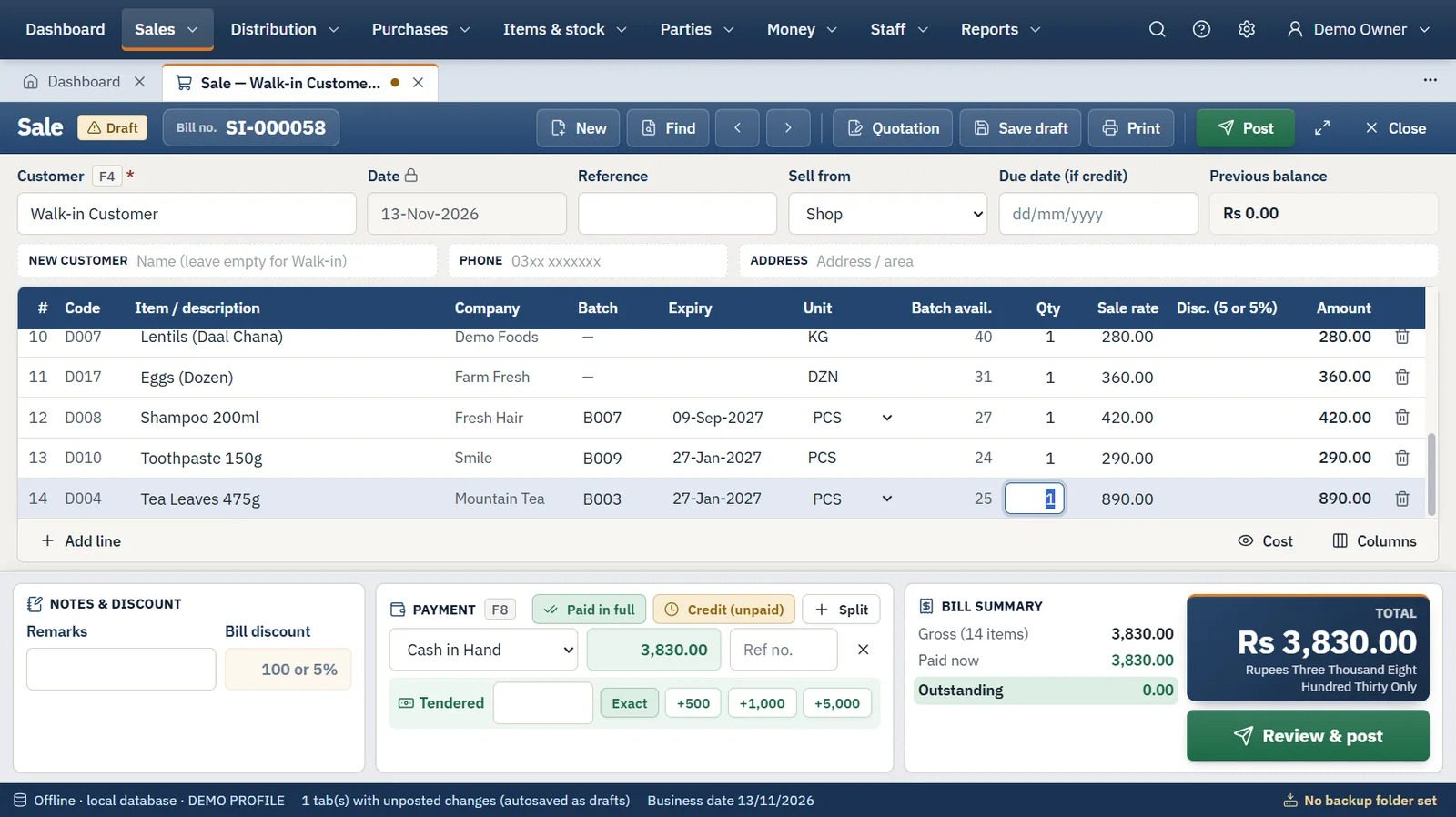
How it works
The same four steps run every day, whatever you sell.
Step 1
We install the program and import your items, customers, suppliers and opening balances from Excel or your old software.
Step 2
Enter the supplier's invoice with batches, packs and carriage. Stock, cost and the supplier's balance update together.
Step 3
Scan or type, take cash, bank or credit, and print. Several bills can stay open in tabs at once.
Step 4
Count the cash, back up to a USB drive, and read sales, profit, stock and receivables in the reports.
Also included
Hardware
FAQ
What medicine distribution business owners ask us before they start. Anything else? Ask us directly.
Each sale line is tied to a batch with its expiry date, and the bill designer controls which columns print.
Yes, both on purchases and on sales. On a purchase the cost is spread over all units received.
Yes. Each item can carry its own sales tax, advance income tax and withholding tax percentage, and the next bill of that item fills them in from the last one.
Yes. The Pakrox Booker Android app works offline for order booking and payment collection and syncs at the office.
No. It is an offline Windows program with its database on your own computer. The internet is used only for licence checks and updates: a lifetime licence keeps working for 30 days without it, a monthly licence for 3 days.
After a free 7-day trial there are two ways to pay. Monthly is Rs 2,500 for the shop software with accounting on one computer, with extra features as add-ons at Rs 1,000 a month each. Lifetime is Rs 50,000 once with every feature included, and updates and support are free for the first year, then Rs 8,000 a year.
Backups run on a schedule to a USB drive or second disk and can be locked with a password. Every backup is checked before it is kept, and restoring is validated before anything changes.
Start a project
Tell us what you need — your message comes straight to our team and we'll get back to you soon.